Undo git add without changing file contents
Cause: Files added with git add enter the staging area for the next commit.
Fix: Run git restore --staged for files you want to leave out of this commit. This removes them from staging while preserving their working file contents. Use it in a repository that already has a commit.
git restore --staged -- report.txt
git status --short
These screenshots show the actual commands and results. Select an image to open it at full size. On small screens, scroll sideways inside a wide image.
1. Check which files are staged
Check the staged file list before committing. The staging area holds the changes you have selected for the next commit.
git status --short
git diff --cached --name-only
Here, both README and report are staged. git diff --cached shows the difference between the staging area and the current commit, while --name-only shows only file names. If you do not want report in this commit, unstage only that file in the next step.
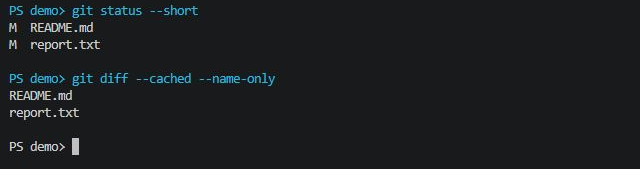
Expected resultBoth README and report appear in the staged file list.
2. Unstage only the selected file
Check the file name, then specify only the file you want to unstage.
git restore --staged -- report.txt
git status --short
--staged targets the staging area, and the file name goes after --. Here, README remains staged, while report remains modified in the working directory. If the file was newly added, it may appear as untracked after unstaging. If the command fails, first check that you are in the repository and that it already has an initial commit.
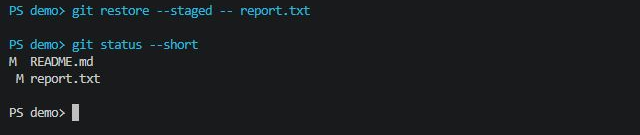
Expected resultREADME stays staged, and report remains modified in the working directory.
3. Check file contents and commit scope separately
Check both that the file contents remain and that the file is no longer staged.
git diff --cached --name-only
git diff -- report.txt
The first command lists only README, and the second shows the changes to report. Opening the file also confirms that Pending report edits remains unchanged. To include report in a commit again, review its contents and run git add for that file. When an AI tool changes several files, checking both the staged list and the diff helps you decide what belongs in this commit.
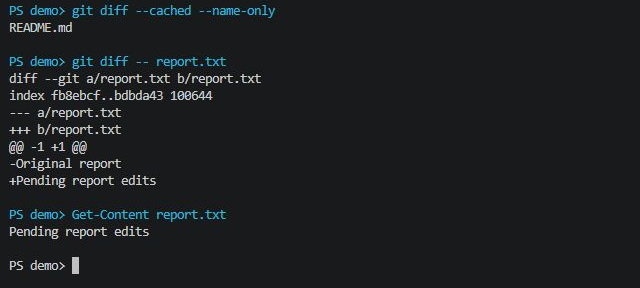
Expected resultReport is absent from the staged list, but its changes remain.
References
Another Git problem?
Compare staged changes and working files with Git diff →