Stop tracking a file when .gitignore has no effect
Cause: Files already tracked by Git still appear as changed when listed in .gitignore.
Fix: Check the rule, then stop tracking with git rm --cached and commit. --cached keeps the working file. First inspect everything already staged.
git diff --cached --stat
git diff --cached
A normal git commit records all staged changes. If unrelated work such as notes.txt appears, stop, finish it in a separate commit, and check again. Do not automatically unstage other work. Continue to the tracking-removal step only when no unrelated changes remain staged.
These screenshots show the actual commands and results. Select an image to open it at full size. On small screens, scroll sideways inside a wide image.
1. Check the ignore rule and tracking status
First, check whether the file matches an ignore rule and is already tracked.
git ls-files app.log
git status --short
In this capture, .gitignore lists app.log, but git ls-files also lists the file. .gitignore keeps untracked files from being added automatically; it does not stop existing tracking. That requires the next step. If your team manages this file together, agree before stopping tracking.
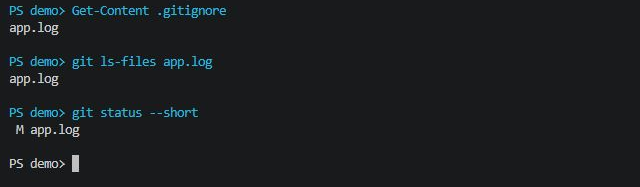
Expected resultapp.log still appears in Git's tracked-file list despite the ignore rule.
2. Stop tracking while keeping the local file
Check the file path and include the `--cached` option when running the command.
First, use both commands below to inspect the file summary and full diff already staged. A normal git commit records all staged changes.
git diff --cached --stat
git diff --cached
If you see unrelated changes, such as notes.txt, stop here, finish that work in a separate commit, then check again. Do not automatically unstage other work. Run the commands starting with git rm below only after confirming that no unrelated changes remain staged.
git rm --cached -- app.log
git add .gitignore
git commit -m "Stop tracking app log"
The first command removes the file from the staging area but keeps it in your working folder. Committing .gitignore and the tracking removal excludes the file from the repository's current file list. Others who receive this change also receive the deletion of the tracked file, so agree on how to handle shared files. Earlier commits still contain the old file contents.
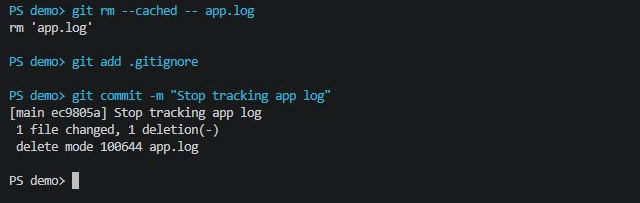
Expected resultA commit removes app.log from the tracked-file list.
3. Check that the file remains and is ignored
Check Git's file list and the actual file separately.
git ls-files app.log
git check-ignore -v app.log
git status --short --ignored
The first command produces no output, and the second shows the matching .gitignore rule. In the final list, !! app.log marks the file as ignored. Opening the file shows that Demo log updated is still there. If sensitive values were previously committed, first consider revoking or replacing them. Stopping tracking only changes the current tracked-file list.
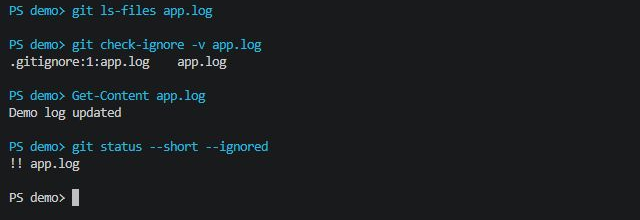
Expected resultapp.log remains locally but is no longer tracked and is now ignored.
References
Another Git problem?
Undo git add without changing file contents →