Fix "fatal: not a git repository"
Cause: Git could not find a repository in the current folder or any parent folder.
Fix: Move to your existing project folder so Git can find the repository, then check its status. Replace my-project below with your actual project path.
cd my-project
git status
If the path does not exist or the error persists, check where the repository is located.
These screenshots show the actual commands and results. Select an image to open it at full size. On small screens, scroll sideways inside a wide image.
1. Check where you ran the command
If git status reports fatal: not a git repository, compare your current folder with the project location. In this example, the command ran outside the my-project repository. A repository is a project whose files and change history Git manages. When looking for an existing project, do not blindly run git init where the error occurred.

Expected resultThe current location produces the not a git repository error.
2. Move to your existing project folder
If your project is in my-project under the current folder, run the following. If it is elsewhere, use its actual path.
cd my-project
git status
cd changes your working location, and git status shows the repository's working state. If the path does not exist, stop and check where you saved or cloned the project.
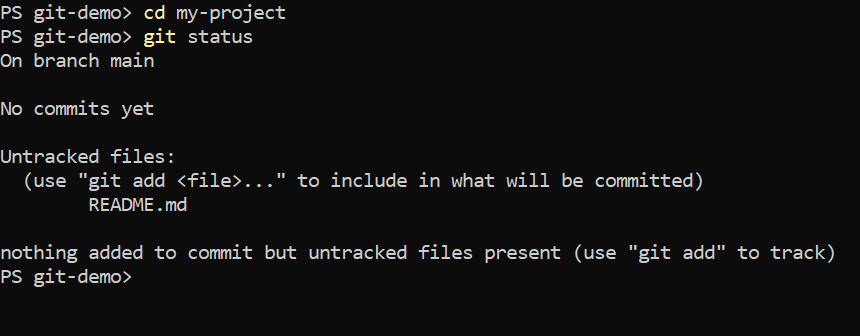
Expected resultIn my-project, git status shows main and the status of README.
3. Check that repository status replaces the error
Run git status again to check the repository. In this example, No commits yet means Git found the repository, but it has no commits yet. If the error persists, check the actual clone location and whether .git exists. A folder downloaded as a ZIP or missing repository metadata is a different situation that simply changing folders does not address.
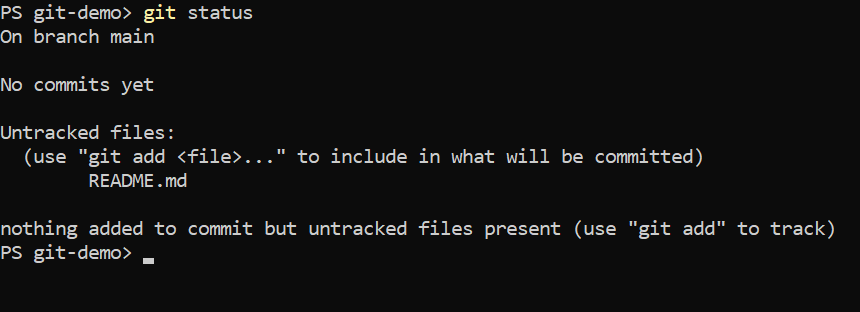
Expected resultgit status completes successfully and shows the main branch status.