Fix "The current branch main has no upstream branch"
Cause: The current main branch is not linked to a remote branch for default pushes.
Fix: First confirm that main on origin is the intended destination, then push and set the tracking relationship together so future pushes can use that destination.
git push -u origin mainIf the remote URL is not the intended one or you see non-fast-forward, stop and investigate the cause.
These screenshots show the actual commands and results. Select an image to open it at full size. On small screens, scroll sideways inside a wide image.
1. Check the branch and remote URL
If git push reports has no upstream branch, check git branch --show-current and git remote -v. The upstream is the remote branch linked to the current branch by default. This example has a main branch with commits and an origin remote, but no tracking relationship. If the remote URL is not the intended destination, stop before pushing.
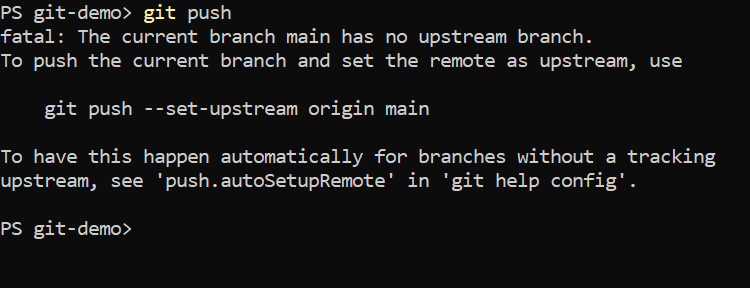
Expected resultAn error reports that the current main branch has no upstream.
2. Push to the specified destination and set tracking
Run the following when the current branch is main and the intended remote is named origin. If the names differ, use the names you verified.
git push -u origin main-u saves the tracking relationship with the destination after a successful push. If you encounter an authentication, permission, or non-fast-forward error, stop and resolve its cause. This option does not bypass protection of remote history.
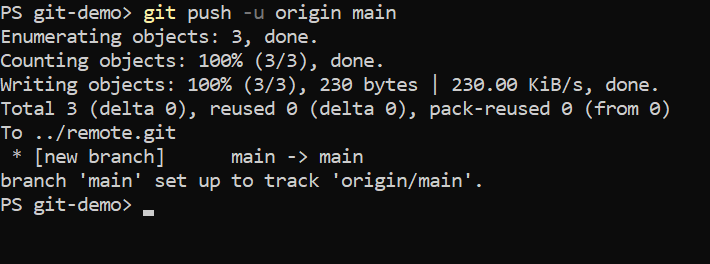
Expected resultmain is pushed and configured to track origin/main.
3. Check that the next push finds its destination
Use the following commands to check the short branch status and how the next push behaves.
git status -sb
git push
In this example, the output shows main...origin/main and Everything up-to-date. This means main tracks origin/main and the same history has already been sent. If a different destination appears, stop further pushes and recheck the linked remote and branch.
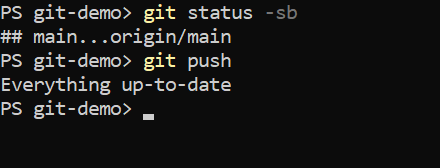
Expected resultThe upstream is origin/main, and the next push reports Everything up-to-date.