Fetch a remote branch to fix Git's invalid reference error
Cause: Switching can fail when your repository does not yet know about a newly created remote branch.
Fix: Save your work, then fetch and inspect the actual remote-tracking list before switching. Replace origin and the branch name with those for your project.
git fetch origin
git branch -r
Only after fetch succeeds and origin/feature-report appears, run:
git switch --track origin/feature-reportIf it remains absent, use the diagnostic table below to distinguish the server's branches from your configured fetch scope.
These screenshots show the actual commands and results. Select an image to open it at full size. On small screens, scroll sideways inside a wide image.
1. Check the branch name and current remote branch list
If you see fatal: invalid reference: feature-report, first check for typos and confirm that the branch exists.
git branch -rIn this capture, feature-report has been created on the remote, but the local list shows only origin/main. Confirm that the target exists on the remote before fetching updated information. If the branch does not exist or belongs to another remote, check the repository and branch name first.
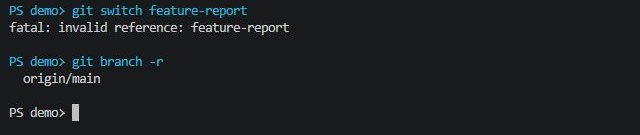
Expected resultSwitching fails, and the remote branch list shows only main.
2. Fetch remote information and open a tracking branch
Save your work, then check the fetch result and branch list first.
git fetch origin
git branch -r
Fetch retrieves remote branch information. After it succeeds and origin/feature-report appears, create and switch to a tracking branch:
git switch --track origin/feature-reportIf it is missing or fetch fails, use the next diagnostic section. If a local branch already has that name, inspect its commit and upstream with git branch -vv before deciding whether to use it. Do not overwrite existing work.
Distinguish server existence from fetch scope
git branch -r lists remote-tracking branches known to your local repository. Absence there does not establish absence on the server. These three commands read the URL, the server's branch advertisement, and the configured fetch scope.
git remote get-url origin
git ls-remote --heads origin refs/heads/feature-report
git config --get-all remote.origin.fetch| Observation | Meaning and next action |
|---|---|
| The first command shows an unexpected repository | Confirm which repository owns the branch before switching. |
ls-remote succeeds with no output | That exact branch name was not advertised to this connection. Check spelling, capitalization, and where the author pushed it. |
ls-remote fails with an access or connection error | Branch existence is still unknown. Resolve the reported URL or access problem and repeat the query. |
A commit ID and refs/heads/feature-report appear, but fetch includes only main | The branch exists outside the normal fetch scope. The one-time path below is available. |
| The branch exists and the configured scope includes all branches | Recheck the git fetch origin error and the repository in which you ran it. Do not switch before fetch succeeds. |
A common all-branches mapping is +refs/heads/*:refs/remotes/origin/*; a main-only mapping is +refs/heads/main:refs/remotes/origin/main. Read all lines if there are multiple or exclusion rules. If no mapping is printed, check the clone method and repository policy before adding configuration.
In an isolated exercise cloned with --single-branch --branch main, ls-remote advertised feature-report, but an ordinary fetch still left only origin/main in the remote-tracking list. Querying a nonexistent feature-missing succeeded with empty output. Authentication failures were not executed in this exercise.
Expected result: You can distinguish an unadvertised name, a connection failure, and restricted fetch scope.
Open another branch once without changing main-only fetch configuration
Choose this path only after confirming that the remote branch exists and the normal fetch scope is limited to main. It lets you inspect the branch without changing permanent fetch configuration. Save work in progress and check that the intended local branch name does not already exist.
git fetch origin feature-reportRun the next block only after that command succeeds. Stop on failure. FETCH_HEAD identifies the commit just fetched; another fetch in between can replace it.
git switch --no-track -c feature-report FETCH_HEAD
git status --short --branch
This path produces ## feature-report. No upstream was configured, so it does not show the normal path's ...origin/feature-report. --no-track makes that choice explicit. The synthetic exercise verified that report.txt contained Report branch ready, with byte-for-byte preservation of .git/config.
For continued collaboration, agree on the reason for the restricted fetch scope and the tracking policy first. Opening the files does not configure the target of a future git pull. Read the final verification section according to the path you chose.
Expected result: The remote branch's files are open, permanent configuration is unchanged, and the lack of an upstream is explicit.
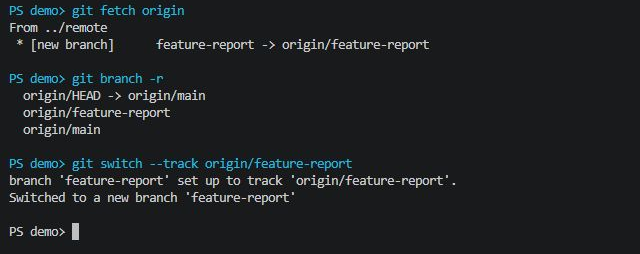
Expected resultThe new remote branch appears in the list, and local feature-report tracks it.
3. Check the branch and its files
After switching, check the remote tracking relationship and file contents.
git status --short --branchThis capture shows ## feature-report...origin/feature-report, and the new report file contains Report branch ready. Confirm that the current local branch tracks the intended remote branch and that the files match that branch's state. If an expected file is missing, recheck the branch's latest commit and remote repository before making changes.
For the one-time path, expect ## feature-report and the intended file content. The ...origin/feature-report suffix belongs to the normal tracking-branch path.
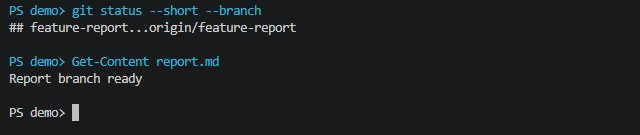
Expected resultThe remote tracking relationship and the branch's report file are both visible.
References
Another Git problem?
Fix "The current branch main has no upstream branch" →
Use git worktree to open another branch without disturbing your work →