Keep detached HEAD work by creating a Git branch
Cause: When HEAD points directly to a commit instead of a branch, there is no branch name holding onto your work commits.
Fix: Create a new branch at the current commit, then check the status.
git switch -c rescue-work
git status --short --branch
The first command creates rescue-work at the current commit and switches to it. Check that the next command shows ## rescue-work.
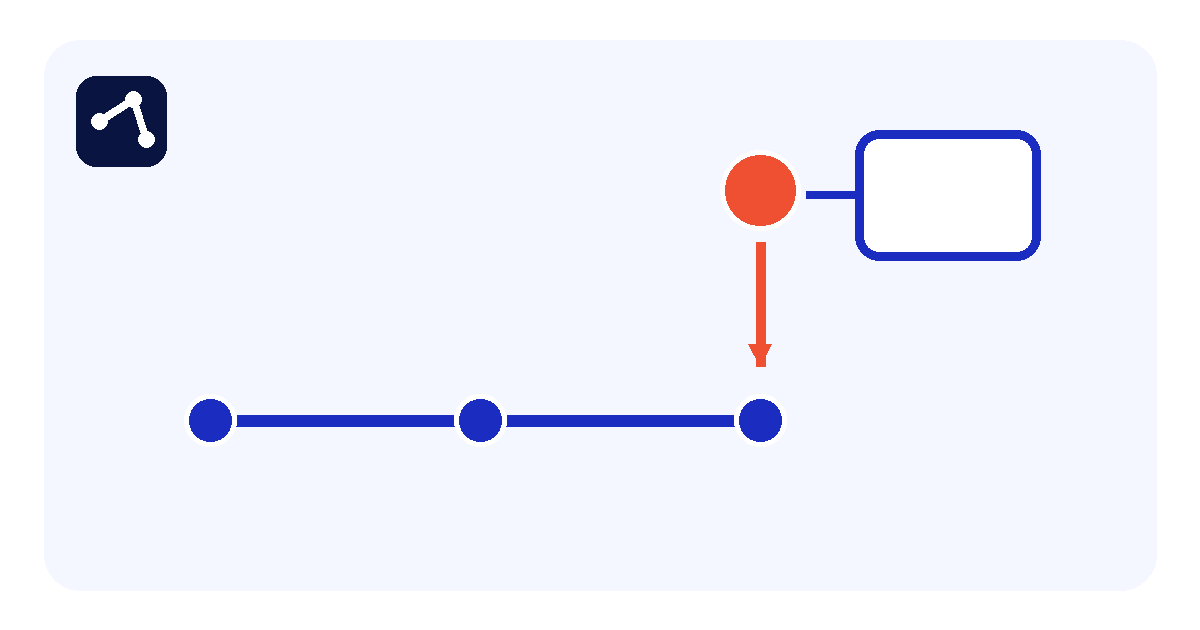
These screenshots show the actual commands and results. Select an image to open it at full size. On small screens, scroll sideways inside a wide image.
1. Check whether you are working without a branch
Check your current state before switching to another branch.
git status --short --branch
git log --oneline --decorate -2
## HEAD (no branch) means you are not currently on a named branch. In this capture, only HEAD points to the Detached experiment commit, while main points to an earlier commit. Create a new branch here to keep this work. If you have already moved elsewhere, first check that the current commit contains the work you want to keep.
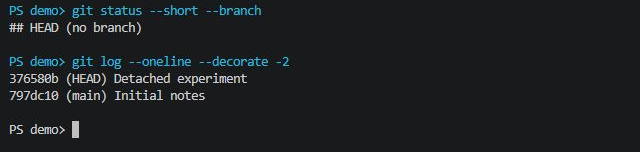
Expected resultYou see HEAD (no branch) and a current commit with no branch name.
2. Create a branch at the current commit
Choose a new branch name and run:
git switch -c rescue-workThe -c option creates a branch at the current commit and switches to it. rescue-work is an example name; choose one that fits your project. If that name already exists, check what the existing branch points to and choose a different new name.

Expected resultYou see Switched to a new branch and rescue-work.
3. Check that the branch keeps your commit and files
After creating the branch, check that it points to the same work commit.
git status --short --branch
git log --oneline --decorate -2
You should see ## rescue-work and HEAD -> rescue-work pointing to your work commit. The capture still shows Detached experiment, and the README contains Keep detached work. Open the file to check its contents, then continue working and committing on this branch.
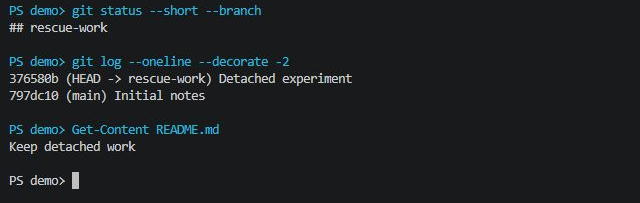
Expected resultThe new branch points to your work commit, and the README contents remain unchanged.
References
Another Git problem?
Rename a Git branch: A local branch before pushing →
Use git worktree to open another branch without disturbing your work →