Fix "src refspec main does not match any"
Cause: If main has no first commit, there is no history to push.
Fix: If the status is No commits yet and you have reviewed the file to upload, create the first commit, then push it. This gives Git history to send.
git add readme.md
git commit -m "add readme"
git push -u origin main
add selects the file, commit records it, and push sends it to the remote. If the commit or push fails, stop and investigate that error. If commits already exist, first compare the actual branch name with the name you are trying to push.
These screenshots show the actual commands and results. Select an image to open it at full size. On small screens, scroll sideways inside a wide image.
1. Check whether the first commit is missing
If git push origin main reports src refspec main does not match any, check git status and git branch --show-current. In this example, the branch is main and the status is No commits yet. A refspec specifies the local history to send and its remote destination. The same error can also occur when the actual branch name is different.
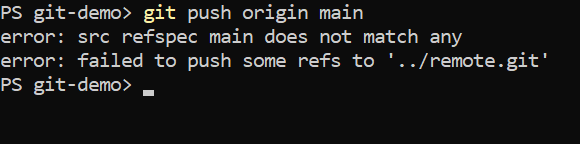
Expected resultThe branch is main, but it shows No commits yet and the src refspec error.
2. Create the first commit from a reviewed file
Review readme.md first, then include only this file in the first commit. A commit records selected changes. These are the commands used in the example.
git add readme.md
git commit -m "add readme"
git push -u origin main
add selects the file for the next commit, and commit records it. push sends it to the remote, while -u also sets the tracking relationship for future use. If the commit or push fails, stop and investigate that error rather than proceeding as if it succeeded.
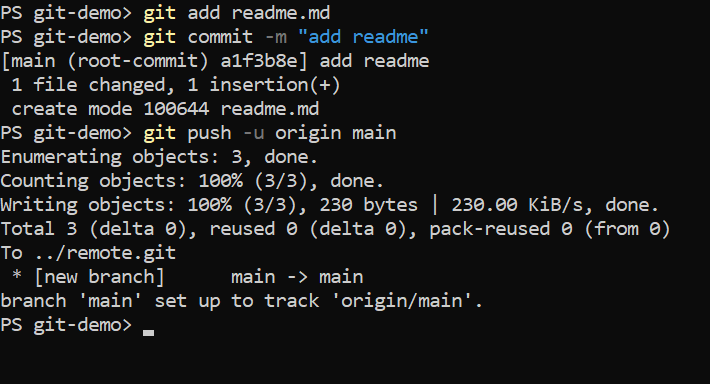
Expected resultThe first commit is created and main is pushed to the remote.
3. Check the remote and tracking branch
Use the following commands to check the short status and the next push result.
git status -sb
git push
In this example, main tracks origin/main, and push reports Everything up-to-date. This means the same history has already been sent. If commits already exist, do not repeat the first-commit procedure; compare the actual branch name with the name in the push command. A force push does not create missing local history.
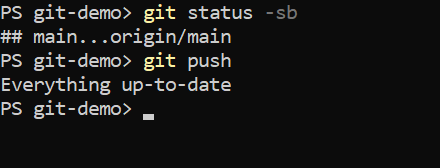
Expected resultmain tracks origin/main, and the local and remote main branches have matching commits.