Fix the last commit message with git commit --amend
Cause: A typo in a commit message makes changes harder to find in the history.
Fix: For the last commit that has not been pushed, check that the staging area is empty before amending the message. The new message also changes the commit ID.
git diff --cached
git commit --amend -m "Add signup"
If other changes are staged, decide first whether to include them. If you are unsure whether the commit has been shared, stop and check the remote and collaboration status first.
These screenshots show the actual commands and results. Select an image to open it at full size. On small screens, scroll sideways inside a wide image.
1. Check the last commit and staging area
First, confirm that the last commit has not been shared with the remote. If others are using the commit, follow your team's procedure for rewriting history before changing its message.
git log --oneline -2
git diff --cached
The capture shows the typo singup in the last message and an empty staged diff. If other changes are staged, decide first whether to include them with the message update. Here, only the message is changed, with no added file changes.
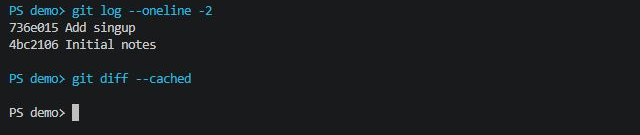
Expected resultThe message typo is visible, and no additional changes are staged.
2. Replace the last commit with a corrected message
Run this command with the corrected message.
git commit --amend -m "Add signup"--amend replaces the last commit with a new commit, and -m specifies the message. Because the staging area is empty, the new commit has the same file contents here. Remember that the commit ID changes. If you are unsure whether the history has been shared, stop and check the remote and collaboration status first.
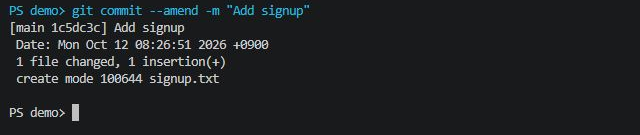
Expected resultA new commit replaces the last commit with the message Add signup.
3. Check the message and file contents
After the update, check both the message and working files.
git log --oneline -2
git status --short
The capture shows the last message as Add signup, with the earlier Initial notes commit still present. The working tree is clean, and the signup file still contains Signup feature. Open the file to check it, then continue reviewing the remaining unshared work.
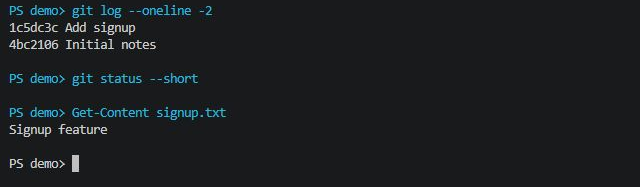
Expected resultThe message is corrected, while the existing file contents and earlier commit remain.
References
Another Git problem?
Compare staged changes and working files with Git diff →